Client Sources
Document Information
Version: v2.1 Updated: 2026-11-16
Feature Overview
| Item | Content |
|---|---|
| Applicable Role | Model Provider |
| Navigation Path | Model Services > Customer Calls > Client Sources |
| Page Route | /modelone/model-observation/provider/apps |
| Managed Object | Customer call count, share, success rate, tokens, and latency aggregated by client source |
New to this page: Client Sources answers "which applications customers use to call my models". Select a month and customer, then compare sources by volume, success rate, and latency.
Terms Quick Reference
| Term | Description |
|---|---|
| Client Source (Provider) | Upstream application or client identity injected in request headers by external customers (e.g., business App, gateway, or Agent ID). |
| Call Share | The percentage of requests initiated by a specific client source relative to total inbound customer requests during the period. |
| Rate-Limited Calls | Requests blocked by platform gateway flow control when customer applications burst past concurrency limits. |
| Avg TPOT | Average Time Per Output Token perceived by the client application during streaming token delivery. |
Prerequisites
- Your account has the publisher-side Customer Calls > Client Sources permission.
- Customer calls with source identifiers exist in the current period.
- The month, model, and customer filters are confirmed.
Page Description
The title is Customer Calls - Client Sources, marked Updated hourly.
| Area | Description |
|---|---|
| Top time & customer filter bar | Month selector, By Date toggle, Model/Customer dropdowns, Expand button, and Name/ID search box |
| Update interval badge | Displays "Updated hourly" indicating statistical metrics are quasi-realtime aggregated hourly results |
| Client sources summary table | Presents source name, requests, share, success rate, failed/rate-limited counts, total tokens, and TTFT/TPOT/E2E latency |
| Actions & drill-down column | Provides direct navigation to inspect detailed customer call logs associated with each source |
- Filters include month,
By Date,Model,Customer(All), Expand, and aName or IDsearch box. - The first column is
Client Source; the remaining columns areRequests,Share,Success Rate,Failed,Rate Limited,Total Tokens,Avg TTFT,Avg TPOT,Avg E2E, andActions. Without data, the table showsNo Data Available.
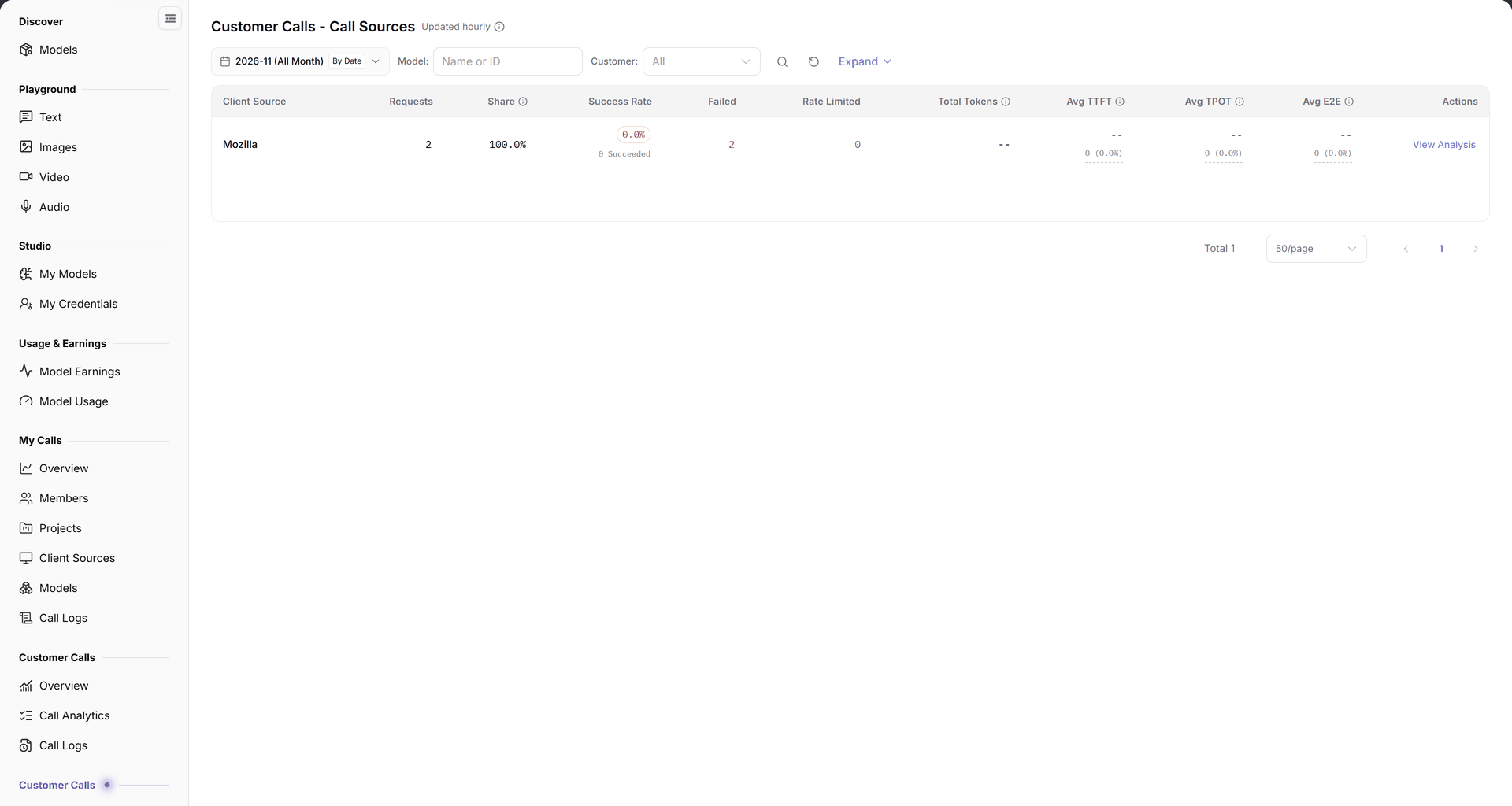
The figure shows filters include month, By Date, Model, Customer, Expand, and Name or ID; the first column is Client Source, followed by Requests, Share, Success Rate, Failed, Rate Limited, Total Tokens, Avg TTFT, Avg TPOT, Avg E2E, and Actions.
Main Operations
- Select a month.
- Use
By Dateto change granularity. - Limit scope with
ModelandCustomer. - Search by source name or ID.
- Compare volume, share, success rate, and latency.
Parameter Quick Reference
Query and Filters
Additional query conditions documented on this page. An em dash means the column is unspecified, not a backend rule. Existing fields remain in the following table.
| Field Name | Required | Field Type | Example | Description |
|---|---|---|---|---|
| Name or ID | — | — | — | Search using the Name or ID box in this page’s filter bar. Other documented conditions remain in the original table. |
Existing Fields
| Field Name | Required | Field Type | Example | Description |
|---|---|---|---|---|
| Month | Yes | Selector | 2026-11 | Statistics month |
| By Date | No | Toggle | On | Aggregation granularity |
| Model | No | Text | Name or ID | Filter by model |
| Customer | No | Selector | All | Filter by customer |
| Client Source | System | Text | App A | Client source name |
| Requests | System | Number | 0 | Source call total |
| Share | System | Percentage | 0% | Share of total calls |
| Success Rate | System | Percentage | -- | Successful call share |
| Failed / Rate Limited | System | Number | 0 | Failed and rate-limited calls |
| Total Tokens | System | Number | 0 | Source token total |
| Avg TTFT / TPOT / E2E | System | Duration | -- | Source average latency |
Pitfalls
- Customer calls without a source ID do not appear here; the Overview total may exceed the source sum.
No Data Availabledoes not mean the source is unavailable.- This is the publisher view; the other Customer Calls group has a different scope.
Result Validation
| Check Item | Success Signal | If Abnormal |
|---|---|---|
| Filter synchronization | Switching months or specifying customers immediately refreshes rows, requests, and share percentages | If the table becomes empty, click reset to clear filters and verify customer calls with source IDs exist in the period |
| Metric accuracy | When requests > 0, share, success rate, and total tokens display accurate non-zero numbers | If success rate is -- or abnormally low, check Failed / Rate Limited counts to analyze customer application parameter issues |
| Latency indicators | Average TTFT, TPOT, and E2E duration values are clearly displayed | If -- is shown, there are insufficient streaming call samples for that client source |
| Source search | Entering an App name or ID in the search box filters the table in real time | Clear extra characters from the search input and retry |
| Action drill-down | Clicking the details button in the Actions column navigates to Call Logs with pre-applied source filters | Verify the current account has cross-customer audit permissions for model providers |
FAQ
The source list is empty
Symptom: Switching to the current month shows No Data Available in the table.
Possible Causes: No customer calls with source identifiers were initiated in the selected period, or customer API calls did not pass standard source headers.
Resolution:
- Switch to a statistical month with active customer business traffic.
- Recommend that customers inject standard Client/App identifier headers in their API requests.
- Clear model and customer filters and retry.
Source total differs from Overview
Symptom: The sum of requests across all client sources is lower than the total requests shown in Overview.
Possible Causes: Overview accounts for all inbound requests including anonymous calls without source IDs, whereas this page aggregates named client sources only.
Resolution:
- Rely on Overview for macro capacity planning, billing, and settlement.
- Use this page to analyze traffic composition and SLA compliance across known external integrated applications.
Notes
- Source names may contain internal application information; do not share screenshots externally.
- Statistics refresh hourly; new calls may be delayed.
Next Steps
- Drill down into Call Logs to inspect single-call timings and request bodies for high-volume or failing client sources.
- Switch to Customers to analyze the enterprise customer entities behind each client source application.
- Correlate with token consumption to verify revenue sharing and settlement in Model Earnings.
Related pages: