Quick Deployment
Feature Overview
| Item | Content |
|---|---|
| Applicable Roles | Model Providers |
| Navigation Path | AI Infra(On-Cloud) > Model Services > Quick Deployment |
| Page Route | /infrahub/user/model/store |
| Managed Objects | Deployable models, smart recommendations, regions, resource flavors, and cost |
Beginner Explanation
Quick Deployment is a deployment wizard. Select a deployable model, review recommended regions and flavors, and create the deployment after confirming resources, cost, and authorization.
Terminology
| Term | Description |
|---|---|
| Deployable Scope | Models and regions available under current authorization and resources. |
| Smart Recommendation | A recommended region and flavor based on model and resource conditions. |
| Deployment Cost | Estimated cost for the selected resource flavor and runtime mode. |
Recommended Operation Order
Confirm deployable scope, review recommendations and cost, create the deployment, and then immediately check status and events in My Deployments.
Beginner Checklist
| Scenario | Do First | Do Not Do Directly |
|---|---|---|
| First visit | Review existing objects, states, and available actions | Change an unknown object |
| Before a change | Verify upstream dependencies, impact scope, and target object | Skip dependency and impact checks |
| After completion | Validate the current and downstream pages with Result Validation | Rely only on a success message |
| Page error | Record the redacted object, time, and page message | Submit repeatedly or record real credentials |
Prerequisites
- The current account has the permission required for Quick Deployment.
- The Operator has completed access, authorization, models, frameworks, images, and policies.
- Before deployment, confirm region, resource flavor, estimated cost, quota, and stop plan.
Page Description
The page provides model selection, region and flavor recommendations, and deployment submission. The current Operator account does not expose this user entry, so this page is partially verified from existing screenshots and the cross-role workflow.
Page screenshots:
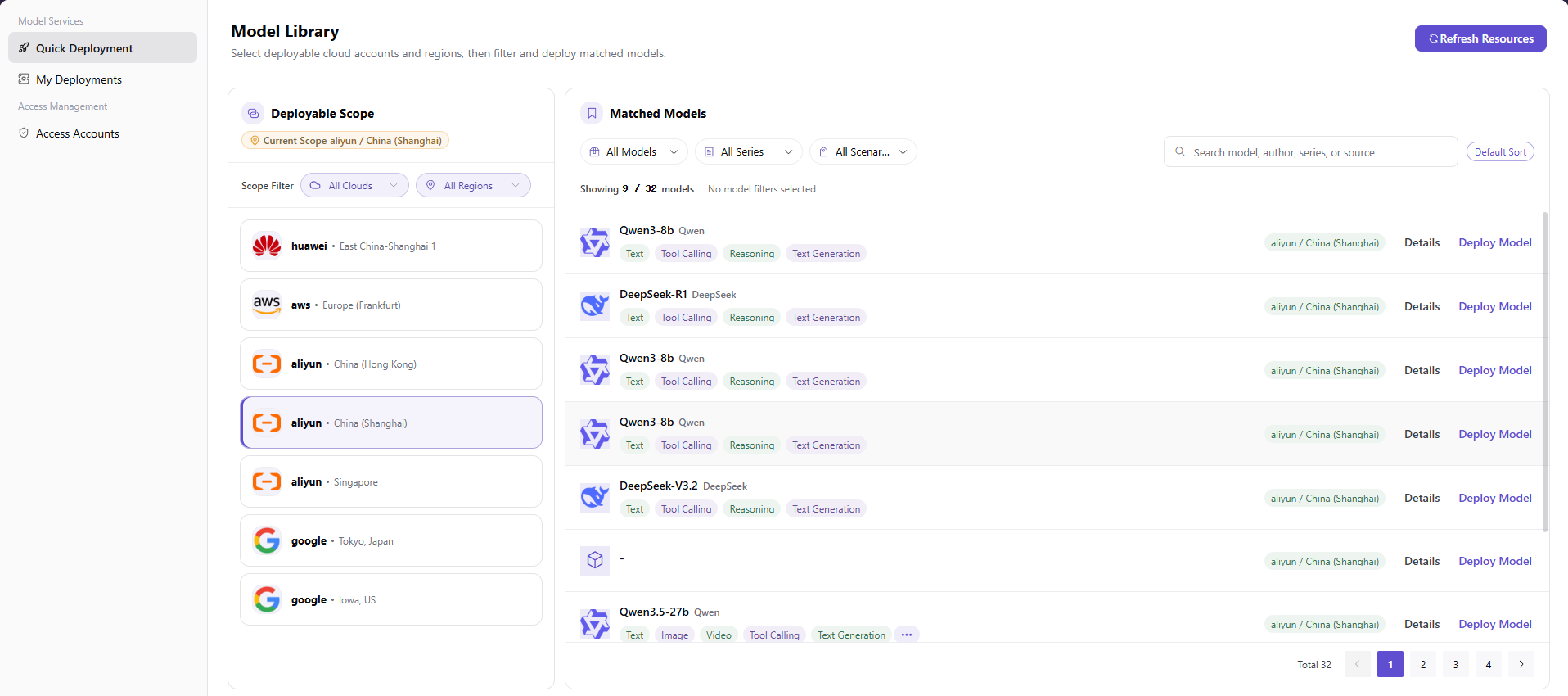
The image shows the Quick Deployment main page, displaying authorized cloud platforms and regions on the left, with matched model cards, capability tags, and Deploy Model action entries on the right.
Main Operations
View Deployable Models
- Open Quick Deployment.
- Locate the target model by name or capability.
- Verify deployable regions, account, and authorization scope.
Review Smart Recommendation
- Select the target model and open Smart Recommendation.
- Compare recommended regions, resource flavors, availability, and estimated cost.
- If no recommendation is returned, check account, authorization, model, and policy prerequisites.
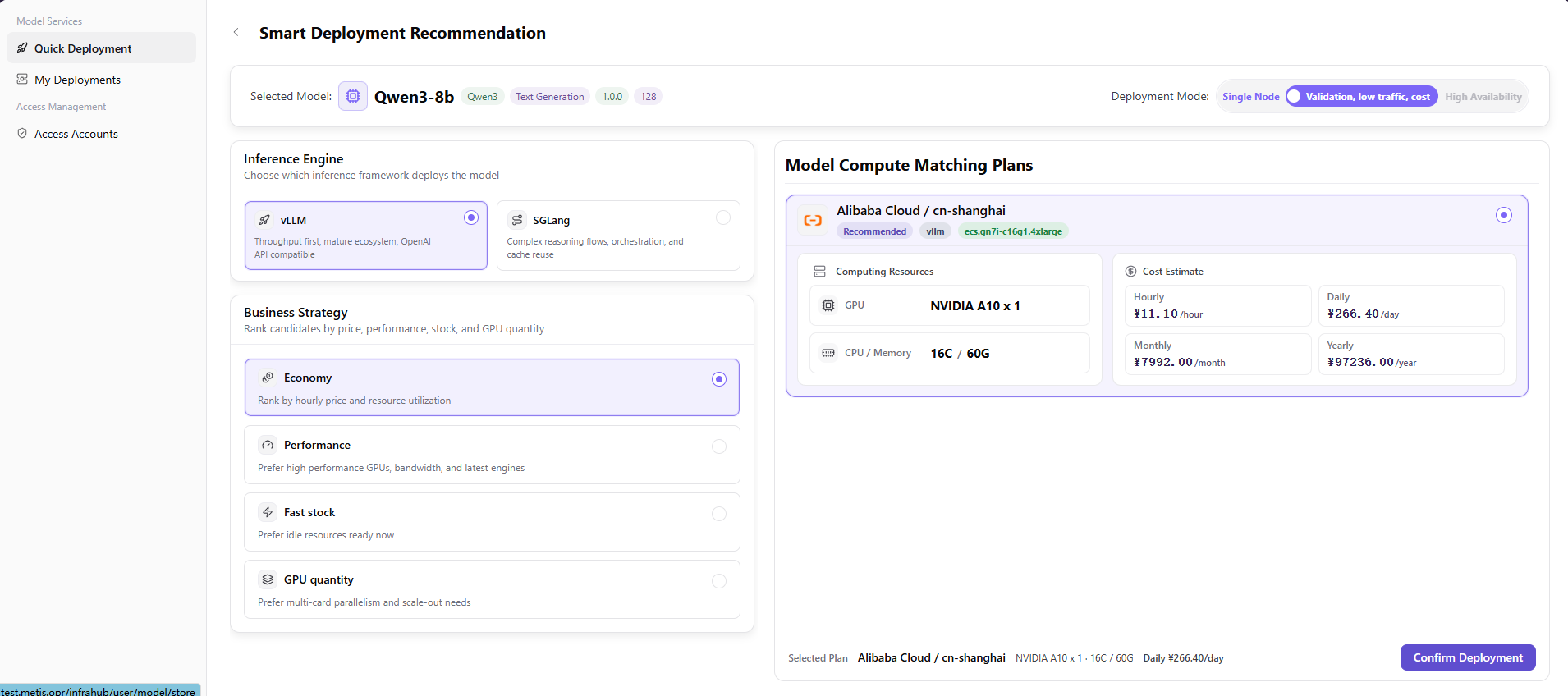
The image shows the Smart Deployment Recommendation page, supporting deployment modes (single node/low cost/HA), inference engines (vLLM/SGLang), business strategy preferences, and presenting the recommended compute plan with cost estimates on the right.
Create Model Deployment
- Confirm the model, region, account, flavor, and cost.
- Enter the deployment name and required configuration.
- Click "Deploy" to create the job.
- Open My Deployments to check status and events. Do not repeatedly submit the same failed job.
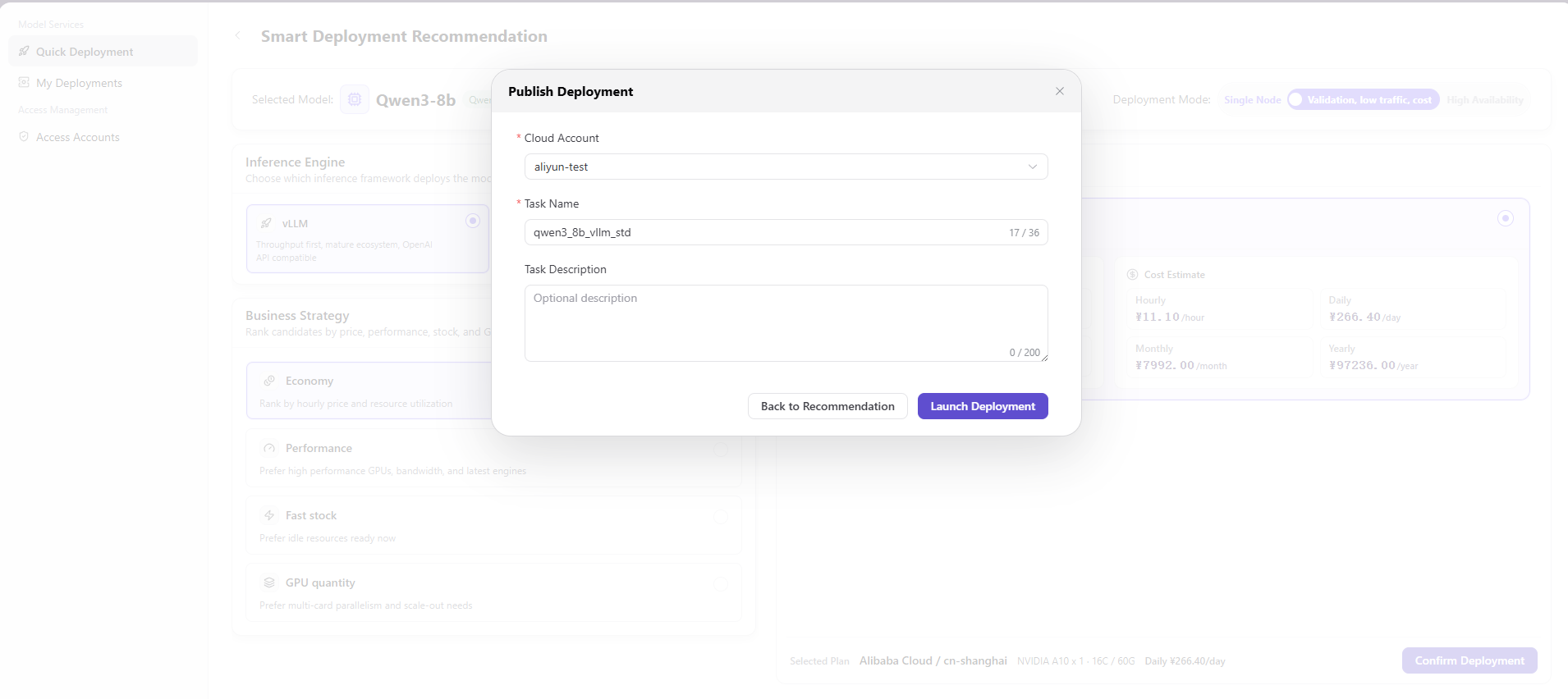
The image shows the Publish Deployment task creation dialog, where you select the target cloud account, specify the deployment task name, and provide an optional description before launching deployment.
Parameter Reference
| Field Name | Required | Field Type | Example | Description |
|---|---|---|---|---|
| Current Scope | No | Status tag | Sample Cloud / Sample Region | Displays the currently selected deployable cloud platform and region. |
| All Clouds | No | Dropdown filter | All Clouds | Filters deployable scope by cloud platform. |
| All Regions | No | Dropdown filter | All Regions | Filters deployable scope by region. |
| All Models | No | Dropdown filter | All Models | Filters matched models by model type. |
| All Series | No | Dropdown filter | All Series | Filters matched models by model series. |
| All Scenarios | No | Dropdown filter | All Scenarios | Filters matched models by model scenario. |
| Search | No | Input/Button | Search | Searches by model name, author, series, or source. |
| Default Sort | No | Button | Default Sort | Sorts the model list by the page default rule. |
| Details | No | Action entry | Details | Opens model details. |
| Deploy Model | Yes | Action entry | Deploy Model | Enters the Smart Deployment Recommendation flow. |
| Selected Model | Yes | Display field | Sample Model | Displays the model and tags prepared for deployment. |
| Deployment Mode | Yes | Segmented control | Single Node | Selects deployment mode. The screenshots show single node, validation/low traffic/cost, and high availability options. |
| Inference Engine | Yes | Radio card | vLLM | Selects the inference engine used to deploy the model. |
| Business Strategy | Yes | Radio card | Economy | Selects the sorting preference for recommended deployment plans. |
| Model Compute Matching Plans | Yes | Recommendation card | Sample Cloud / Sample Region | Displays the recommended cloud platform, region, specification, and cost combination. |
| GPU | No | Display field | Sample GPU x 1 | GPU resources in the recommended plan. |
| CPU / Memory | No | Display field | Sample CPU / Sample Memory | CPU and memory specification in the recommended plan. |
| Cost Estimate | No | Display field | Sample cost | Displays hourly, daily, monthly, and yearly cost estimates. Real amount details are not recorded in documentation. |
| Confirm Deployment | No | Button | Confirm Deployment | Opens the publish deployment confirmation dialog. |
| Cloud Account | Yes | Dropdown | example-cloud-account | Selects the cloud account used to launch deployment. Use placeholder examples only in documentation. |
| Task Name | Yes | Text | demo_deploy_task | Deployment task name. Avoid real business or customer information. |
| Task Description | No | Multiline text | Sample task description | Adds deployment notes. Do not write accounts, secrets, internal addresses, or internal parameters. |
| Back to Recommendation | No | Button | Back to Recommendation | Returns to the recommendation page without submitting the deployment task. |
| Launch Deployment | Yes | Button | Launch Deployment | Final action that launches the deployment task. Review carefully before clicking. |
Pitfalls
- Do not skip the upstream dependency check: The Operator has completed access, authorization, models, frameworks, images, and policies.
- Confirm impact before a configuration change: Before deployment, confirm region, resource flavor, estimated cost, quota, and stop plan.
- A success message does not prove downstream synchronization. Use Result Validation afterward.
- Use only
<API_KEY>,<PERSONAL_KEY>,<ACCESS_KEY_ID>,<ACCESS_KEY_SECRET>,<BASE_URL>, and<ENDPOINT_PATH>for credential and endpoint examples.
Result Validation
| Check Item | Success Signal | If Abnormal |
|---|---|---|
| Page is accessible | Title, navigation, and main content display correctly | Check role permission and navigation path |
| Managed objects are visible | Deployable models, smart recommendations, regions, resource flavors, and cost display as expected | Clear filters and verify upstream dependencies |
| Operation result is saved | The expected state or new record appears | Review page messages, required fields, and dependencies |
| Downstream result is consistent | Associated pages show the change | Wait for synchronization, refresh, and return to the responsible object |
FAQ
Target Object Is Missing in Quick Deployment
Symptom:
The expected object is missing from the list or selector.
Possible Causes:
- Active query criteria filter out the target object.
- An upstream object is disabled, or the current role lacks visibility.
Resolution:
- Clear filters and refresh the page.
- Verify the prerequisite object: The Operator has completed access, authorization, models, frameworks, images, and policies.
- Confirm the current role and data scope, then locate the object again.
Quick Deployment Action Is Unavailable
Symptom:
An expected button, menu, or state switch is unavailable.
Possible Causes:
- The current account lacks the required action permission.
- Object state, references, or prerequisites block the action.
Resolution:
- Verify the permission for the action and the current object state.
- Check references and prerequisites identified by the page message.
- Remove the blocker, refresh the page, and perform the action once.
Quick Deployment Change Does Not Reach Downstream
Symptom:
The page reports success, but a downstream page still shows the old state.
Possible Causes:
- An associated page has stale cache or synchronization delay.
- The current and downstream pages use different roles, tenants, or data scopes.
Resolution:
- Wait for synchronization and refresh both pages.
- Confirm that both pages use the same role, tenant, and object scope.
- If they still differ, return to the responsible object and verify the saved result.
Quick Deployment Data Differs from Another Page
Symptom:
Counts or states differ from an associated page.
Possible Causes:
- The pages use different filters, aggregation rules, or update times.
- The change is still synchronizing, or role-based data scopes differ.
Resolution:
- Align filters and aggregation rules on both pages.
- Check update times and wait for synchronization.
- Compare object details instead of summary counts only.
How to Troubleshoot a Quick Deployment Failure
Symptom:
Submission fails or the state does not change for an extended period.
Possible Causes:
- Required fields, field combinations, or object state do not meet submission rules.
- An upstream dependency is invalid, the request failed, or the same action is already processing.
Resolution:
- Record the redacted object, time, and complete page message.
- Verify required fields, object state, and upstream dependencies.
- Confirm that no identical job is processing before one retry.
Notes
- Before deployment, confirm region, resource flavor, estimated cost, quota, and stop plan.
- Do not put real accounts, credentials, internal locations, or customer data in documentation, screenshots, tickets, or chat records.
- Authorization, deployment, deletion, publication, state, or billing changes require an auditable record and recovery plan.
Next Steps
- Go to
My Deploymentsto view deployment status, events, and monitoring. - After deployment succeeds, obtain redacted invocation information and perform a test call according to permission.
- Continue to monitor cost estimates, resource usage, service status, and business access results.