Video
Document Information
Version: v2.1 Updated: 2026-11-12
Feature Overview
| Item | Content |
|---|---|
| Applicable Role | Model Provider & User |
| Navigation Path | Model Services > Playground > Video |
| Page Route | /modelone/exploration/video |
| Managed Object | Video model, resolution, ratio, and generation tasks |
New to this page: Video turns a text prompt into a short video. Choose a video model and resolution, enter a scene description, and track the task in Task query. Text input and Add attachment are available.
Terms Quick Reference
| Term | Description |
|---|---|
| Text-to-Video | AI generation technology translating text scripts or scene descriptions into coherent video frame sequences. |
| Resolution & Ratio | Visual clarity tiers and framing dimensions; 480P, 720P, 1080P, 16:9, and 9:16 are examples, not ranges promised for every model. Use the selected model’s visible options. |
| Asynchronous Task Pipeline | Lifecycle queuing and background task architecture handling compute-intensive rendering that typically requires 1–5 minutes. |
| Duration Billing | Video models generally bill based on generated video seconds, frame counts, or resolution tiers, differing from token billing. |
Prerequisites
- Your account can open Playground > Video.
- The account has available credits or a free quota for the model.
- Duration, resolution, and billing unit are confirmed.
Page Description
The page contains a model area, a parameter area, and an input area:
| Area | Description |
|---|---|
| Top model & action bar | Displays selected video model name and provider, with Task query and Reset all buttons |
| Parameter configuration panel | Shows the selected model’s resolution and aspect-ratio controls; a separate Ratio 5 entry expands to a numeric control labelled Duration, so the labels are ambiguous |
| Prompt script input console | Multi-line text box for camera motions, lighting, and scene details, supporting Shift+Enter line breaks |
| Rendering & video player area | Displays queuing progress indicator, rendering countdown, and player card with full-screen and MP4 download |
- Screenshot example: model
wan3.0-videoand providerAlibaba; Task query and Model Compare are on the right. - Screenshot parameters:
Resolution 480Pand a control displayed asRatio 5; do not interpret 5 as an aspect ratio. - Input: multi-line box with
Please enter your question, Shift+Enter for a new line. - Reset: Reset all restores model and parameter defaults.
For Doubao-seedance-2-0-260128 / VolcEngine, the buttons show Resolution 720p and Ratio 16:9; a separate Ratio 5 button expands to a Duration numeric control displaying 4–15, currently 5. The main-button and expanded labels conflict, and this range applies only to this model example.
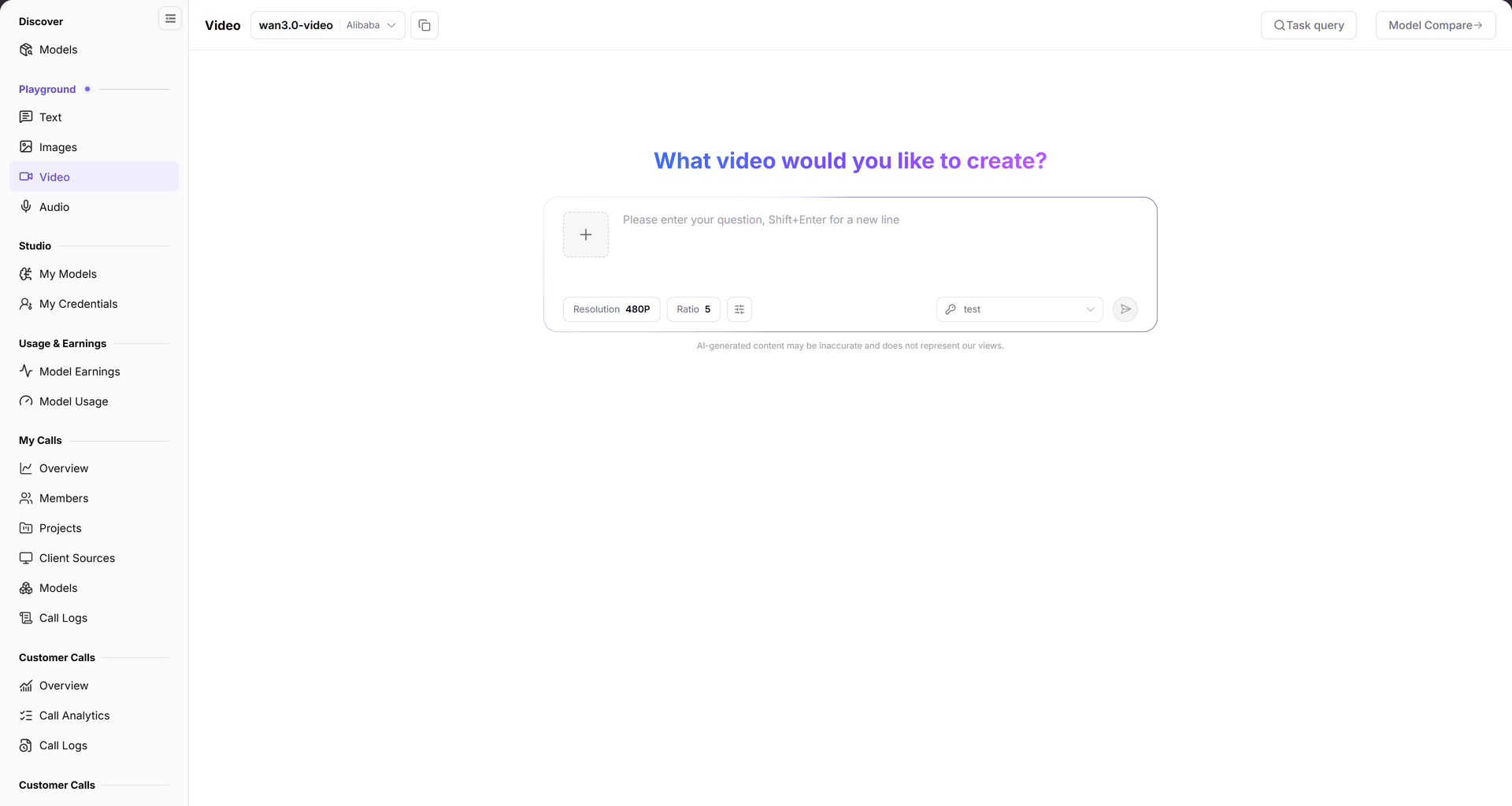
The figure shows a screenshot example of wan3.0-video from Alibaba, with Resolution 480P, Ratio 5, Task query, and Model Compare. The example does not establish the current selected model or ranges for other models.
Main Operations
Select a video model
- Click the model area and select a video model.
- Verify the provider and supported input types.
Set generation parameters
- Choose a
Resolutionfrom the selected model’s visible options. - Check the aspect-ratio control (observed:
16:9); the separateRatio 5button expands toDuration, so its numeric 5 must not be treated as an aspect ratio.
Generate a video
- Enter a scene description.
- Use
Shift+Enterfor new lines, then submit. - Check the task status in the result area.
Query tasks
- Click "Task query".
- Locate the current or previous tasks in the list.
Compare models
- Click "Model Compare" to open two inline model slots.
- Check the current model and
Change modelin the first slot; the second showsSelect a comparison model,Select a model to start comparing, andSelect Model. - When finished, click
Cancel comparisonto return to the single-model view.
Parameter Quick Reference
| Field Name | Required | Field Type | Example | Description |
|---|---|---|---|---|
| Model | Yes | Selector | wan3.0-video | Current video model |
| Provider | System | Text | Alibaba | Provider of the current model |
| Resolution | Yes | Dropdown | 480P | Screenshot example; actual options depend on the selected model’s displayed controls. |
| Ratio | Yes | Parameter control | 16:9 | Aspect ratio visible for this selected model, not a common range for every model. |
| Ratio 5 | Numeric control visible | Expand entry / slider | 5 | The main button reads Ratio 5, while the expanded control is labelled Duration; the example model shows a numeric range of 4–15, currently 5. |
| Prompt | Yes | Multi-line text | Seaside sunset, slow push-in | Scene description |
Pitfalls
- Video generation usually takes longer than text or images; use Task query to track progress.
- Resolution and ratio affect generation time and price.
- A video model may support only specific input types; check the modality on the model details page.
Result Validation
| Check Item | Success Signal | If Abnormal |
|---|---|---|
| Video model selected | The top bar accurately displays the model name (e.g., wan3.0-video) and provider info | If missing, open Models to check whether the tenant has active video model authorization |
| Parameters configured | Resolution and Ratio dropdowns show concrete values, and the script input box is active | If unsupported parameter errors occur, verify whether the model supports the chosen resolution tier |
| Task creation successful | Submitting triggers a success toast, renders a progress card, and logs the task in Task query | If insufficient balance or timeout occurs, verify credits and review the failure reason in Task query |
| Asynchronous progress | Clicking "Task query" loads current queue position or rendering percentage | Video queuing may take 1–3 minutes; maintain the tab or track via Task query without resubmitting |
| Playback & export | Upon completion, an embedded video player loads, plays smoothly, and provides an MP4 download link | If playback shows a black screen or decode error, check browser codecs or download the file locally |
FAQ
No result for a long time
Symptom: After submitting a scene script, the page remains in queuing or processing state without displaying the video.
Possible Causes: Video generation is compute-intensive, and the GPU cluster queue is congested; or complex camera dynamics caused rendering timeouts and automated retries.
Resolution:
- Open Task query to check the exact rendering percentage and queue position.
- Maintain the session until rendering finishes; avoid clicking submit repeatedly to prevent duplicate deductions.
- If the task status marks Failed, review the specific error code and retry with a lower resolution.
The model rejects the input
Symptom: Submitting a prompt triggers invalid parameter, format incompatibility, or generation block notices.
Possible Causes: The selected model only supports Image-to-Video and rejects pure text prompts; or prompt content violates automated content compliance guidelines.
Resolution:
- Navigate to Models to verify the model's exact specifications and input modality requirements.
- Review the prompt for sensitive keywords, policy-violating topics, and refine phrasing.
- Switch to a standard Text-to-Video model and retry.
Notes
- Do not generate infringing, illegal, or privacy-invasive content.
- Video is billed by duration, resolution, or seconds; confirm quota before batch generation.
- Verify copyright and compliance before commercial use.
Next Steps
- Verify duration-based deductions and GPU compute charges in call logs and usage statements.
- Download verified video assets for presentations or extract parameter setups for backend API integration.
- Explore the image playground to establish a connected text-to-image to image-to-video creative workflow.
Related pages: