Models
Document Information
Version: v2.0 Updated: 2026-11-04
Feature Overview
| Item | Content |
|---|---|
| Applicable Role | Model Provider & User |
| Navigation Path | Model Services > Discover > Models |
| Page Route | List /modelone/store/model; details /modelone/store/model/{model ID} |
| Managed Object | Published models, model authors, provider instances, pricing, and access information |
New to this page: The Models page is the catalog of callable models. Narrow the list by capability, author, or source, open a model to compare providers and prices, then try it in Playground or copy the Quick Start details into your application.
Terms Quick Reference
| Term | Description |
|---|---|
| Models Marketplace | The catalog of published, callable large models and AI services for tenants and developers. |
| Model Author | The original organization or open-source team developing the model, such as DeepSeek, OpenAI, Qwen, or Anthropic. |
| Provider | The infrastructure vendor hosting physical compute, providing API endpoints, and guaranteeing service SLAs. |
| Playground | The built-in interactive visualization console for zero-code testing across text, image, audio, and video modalities. |
Prerequisites
- Your account can open Discover > Models.
- The target model is published and visible to your account or tenant.
- Balance, price, context limit, and protocol are confirmed before calling.
Page Description
The page contains a filter area, a title area, and a model list:
| Area | Description |
|---|---|
| Top search & filter bar | Modality multi-select, model author/source/series filters, search box, and Expand Filter button |
| Catalog title & scope bar | Title, All Models / Private Models tabs, Publish Model button, sorting options, and card/list view toggle |
| Modality counters bar | Real-time counts for Multimodal, Text, Image, Audio, Video, Embeddings, Rerank models |
| Model cards and rows | Model name, author, capability tags, context length, weekly calls/tokens, pricing, and release status |
- Filters: search box,
Input Capability,Output Capability,Model Series,Context,Billing,Model Author,Model Source,Scene; use Expand Filter when space is limited. - Title area:
Models, Publish Model (visible to model providers),All Models/Private Modelstabs,Newestsorting, and list/card view toggles. - Capability counters:
All,Multimodal,Text,Image,Speech,Video,Embeddings,Rerank, each with the current count. - Model row: model name, author, type and capability tags, context length,
Weekly Calls,Weekly Tokens, price incredits ... / 1Mor per image/second,≈ USD ..., release date, andReleasedstatus.
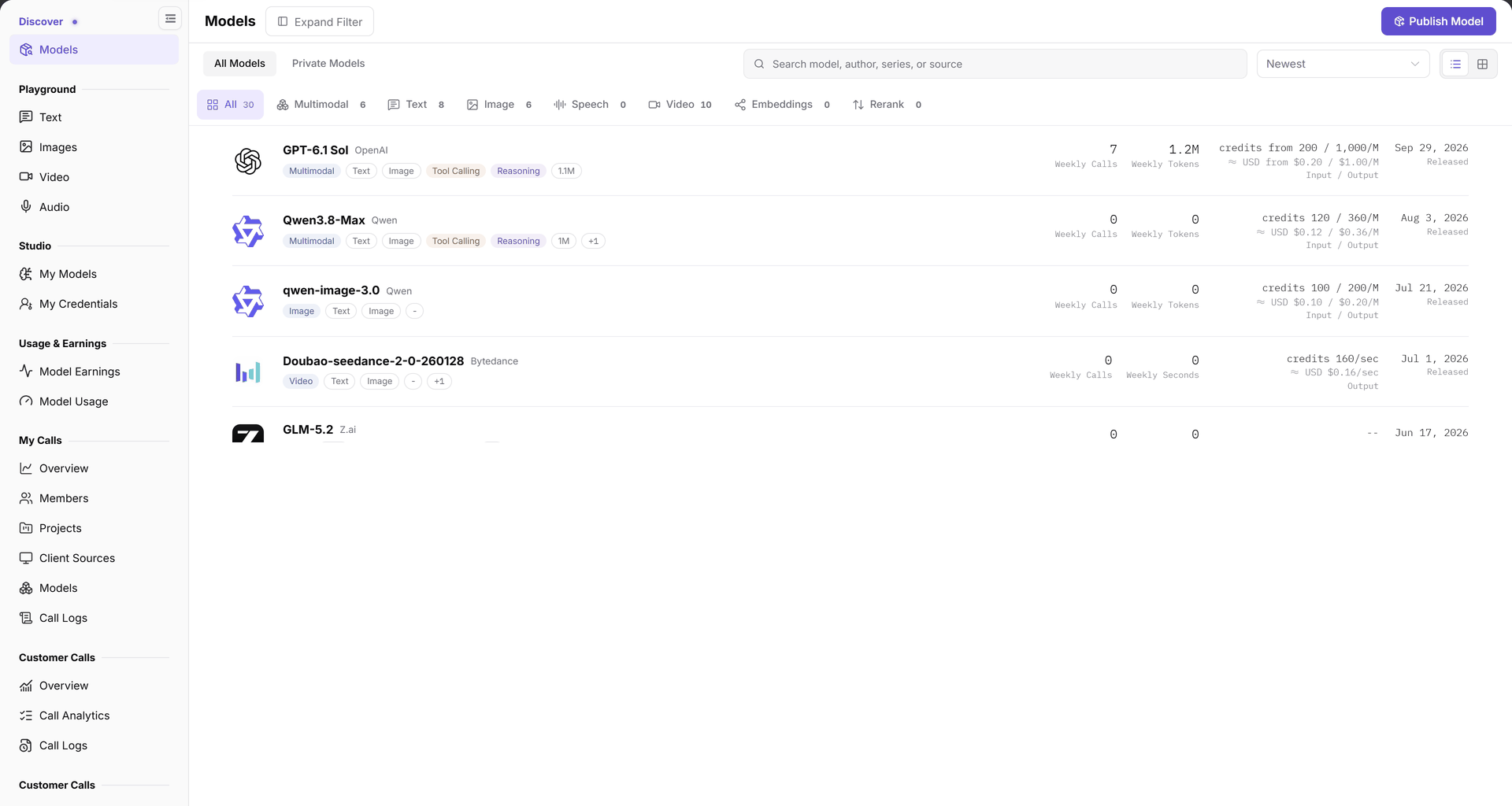
The figure shows the search box reads Search model, author, series, or source; the capability counters show All 30, Multimodal 6, Text 8, Image 6, Video 10. Each row shows weekly calls, weekly tokens, input/output price, and release date.
Model details
The details page shows the model name, author, release date, model ID, price, context, max input/output, modality, capability tags, and protocols. The page provides five tabs: Providers, Quick Start, Performance, Overview, and Best Practices.
On Providers, filter by All, Public, Private, or Aggregate, and group by All, By Provider, or By Model Source. Each provider card shows the route ID, provider, price, context, TTFT, Throughput, Success Rate, Weekly Calls, Weekly Tokens, and Uptime, with Playground and Quick Start buttons.
Main Operations
Filter models
- Enter a model name, author, series, or source in the search box.
- Expand
Input Capability,Output Capability, and other filters as needed. - Switch between
All ModelsandPrivate Models. - Choose
Newestin the sort list, or switch the list/card view.
Open model details
- Click a model name to open its details.
- Check the model ID, price, context, and protocols at the top.
- On
Providers, compare price, latency, success rate, and weekly calls. - Switch to
Quick Start,Performance,Overview, orBest Practicesas needed.
Try or integrate a model
- Click "Playground" on a provider card to open the matching Playground.
- Or click "Quick Start" on the provider card to view access details.
- Replace addresses, model IDs, and keys in the sample with placeholders; never save real credentials.
Publish a model
Model providers can click "Publish Model" in the upper right. Publishing scope and steps are described in My Models.
Parameter Quick Reference
Query and Filters
The query group lists the real controls of the page filter area. "As needed" describes how the control is used, not a backend required rule; "—" means this page does not specify an example.
| Field Name | Required | Field Type | Example | Description |
|---|---|---|---|---|
| Search | No | Text | GPT-6.1 | Search by model name, author, series, or source |
| Input / Output Capability | No | Multi-select | Text, Image | Filter by supported modality |
| Model Series | No | Single select | Qwen3.8 | Filter by model series |
| Context | No | Single select | ≥128K | Filter by context window |
| Billing | No | Single select | Free, Paid | Filter by billing type |
| Model Author | No | Single select | OpenAI | Filter by author |
| Model Source | No | Single select | AGIOne | Filter by source |
| Scene | No | Single select | Text Generation | Filter by scenario |
Existing Fields
| Field Name | Required | Field Type | Example | Description |
|---|---|---|---|---|
| Model scope | No | Tab | All Models / Private Models | Switch visible scope |
| Sort | No | Dropdown | Newest | Control list order |
| Weekly Calls | System | Number | 7 | Calls in the last week |
| Weekly Tokens | System | Number | 1.2M | Tokens in the last week |
| Price | System | Text | credits 200 / 1,000/M | Token price or per-image/second price |
| Status | System | Tag | Released | Current publication status |
Pitfalls
- Confirm the current filters and tab before reading counts; do not treat a category count as the total.
- One model can have multiple providers. Price, latency, and success rate come from each provider card, not the model row.
- Billing units differ by modality: tokens for text, images for images, seconds for video. Align units before comparing prices.
All ModelsandPrivate Modelsare separate scope tabs; confirm the active tab before reading counts.
Result Validation
| Check Item | Success Signal | If Abnormal |
|---|---|---|
| Filters applied | Model card counts and top capability counters update synchronously after selecting filters or typing a query | Click "Reset" to clear conflicting filters and check whether published models exist under the chosen criteria |
| Details match | Clicking a model card opens the details page with identical model title and model ID | If a 404 or permission error occurs, verify whether your tenant account has visibility permissions for the model |
| Provider card details | The Providers tab accurately displays pricing, context window, TTFT, throughput, and uptime for each provider | If the provider list is empty, no instance is active for this model; contact the platform operator |
| Test and access entries | "Playground" and "Quick Start" buttons are visible and active on provider cards | If disabled, verify whether the model supports interactive testing for its designated modality |
| Empty result recovery | An empty state prompt appears when no matches are found, and the full catalog restores when filters are cleared | Check whether the search box contains invisible whitespace or unclosed filter tags |
FAQ
The target model is not found
Symptom: Typing the model name returns no matching cards or rows in the catalog.
Possible Causes: Active filter criteria (such as input/output modality or author) conflict with the search query; the model is private to another tenant; or the model has not been published or approved.
Resolution:
- Clear all modality, series, and author filters, then search again.
- Switch to the
All Modelstab to verify whether the model is restricted to a private scope. - Check with the platform administrator or model provider to ensure the model is released and tenant visibility is configured.
Price shows --
Symptom: The model row or provider card displays -- for input/output price.
Possible Causes: The provider has not configured token pricing rules, or the model is currently under maintenance or free preview without defined billing tiers.
Resolution: Use the current provider card display as authoritative; if billing is required, defer production traffic integration until the provider configures active pricing.
The same model shows different prices
Symptom: Multiple provider cards for the same model display divergent rates and fees.
Possible Causes: Different infrastructure providers offer varied compute instances, network routes, and SLA tiers, or different pricing units apply (per 1M tokens vs. per image/second).
Resolution: Identify the specific provider name and billing unit in each card, align metrics to the same standard, and choose the optimal provider instance based on price and SLA.
Notes
- Trying or calling a model creates records and consumes quota. Confirm the model, provider, and price first.
- Replace model IDs, addresses, and keys in Quick Start with environment-specific values; never write real credentials into documents or screenshots.
- Model capability, price, context, and protocols are defined by the current details page.
Next Steps
- Experience model inference and adjust parameters in interactive playgrounds.
- Review call logs, token metrics, and latency percentiles in call analytics.
- Model providers can package and publish new service instances in My Models.
Related pages: