Model Sources
Target Outcome
Maintain an upstream source and its Endpoints (service access points) so publishers can select the correct address and protocols. The source itself does not hold a call address; the Base URL is the call root address and belongs to an Endpoint.
Applicable Roles
- Operator Admin
Before You Start
- Permission to maintain Model Services > Settings > Model Sources.
- Obtain the upstream Base URL, region tag, console/documentation URLs, and protocol list. Never put real authentication values in shared materials.
Procedure
- Open Model Services > Settings > Model Sources. Do not confuse it with the model-source analytics page under Platform Call Analytics, which only displays call data.
- Click Create Model Source, enter a unique Model Source Code (identifying the upstream source, not a specific model route), and complete display names on all three language tabs: 简体中文, English, and Español.
- Click Create and Configure Endpoints to open the configuration page.
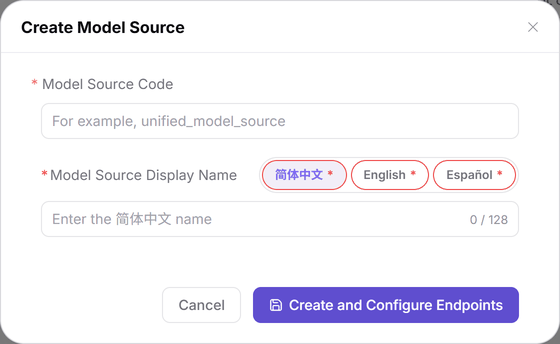
The figure shows the creation dialog with Code and multilingual display names only. Call addresses are configured on Endpoints afterwards.
- Under Endpoint Management, click Add Endpoint. Enter the display name, region tag, and Base URL; maintain the official-endpoint flag and console/documentation URLs as needed.
- Select the protocols actually supported by the Endpoint, then click Save Endpoint.
- Review the source-level information and use Save Model Source in the header for source-level changes. These saves belong to different levels and do not replace each other.
- Return to the list or open Details to check Code, Endpoint count, region, Base URL, and protocols; continue to Model Templates to assemble presets.
Completion Checklist
| Check | Pass Criteria |
|---|---|
| Source | The unique Code and three language names are correct; the record is in the list. |
| Endpoint | Details show the intended access point, Base URL, and protocols. |
| Downstream reference | The template's provider and region match the intended source. |
Troubleshooting
| Symptom | Check First and Continue |
|---|---|
| No creation entry | Ensure this is not the statistics page; see Model Sources. |
| Creation cannot complete | Check Code uniqueness and all three language names. |
| Address is missing or count is unchanged | Complete Endpoint configuration and click Save Endpoint; see Model Sources FAQ. |