Platform Governance & Access Control
This scenario combines identity permissions, resource authorization, model visibility, API credentials, rate limits, and credits into one governance path for answering who can access what, how much they can use, and how changes are traced.
Applicable Roles
- Platform Operator designing and auditing access
- Model Provider and End User validating their effective permissions
Target Outcome
- Users, tenants, and roles form clear organizational boundaries.
- Cloud, On-Prem, and model resources are visible only in authorized scopes.
- API keys, projects, model grants, rate limits, and credits constrain calls together.
- Permission and credit changes can be validated with real roles and traced.
Governance Layers
| Layer | Controlled Objects | Entry |
|---|---|---|
| Identity | Tenants, users, roles, menus, and actions | Identity Authorization |
| Cloud resources | Cloud platforms, regions, and tenant authorization | On Cloud Resource Access |
| On-Prem resources | Regions, flavors, tenant quota, and credits | On-Prem Compute Onboarding, Metering & Monitoring |
| Models | Public/private scope, publishing approval, and visibility | Publish Models, Model Publishing Approval |
| Projects and calls | Project budgets, keys, model allowlists, and member quota | Project, Key, and Budget Governance, Member Quota Request and Allocation |
| API rate control | API Pattern, rule version, node cache, and hit audit | API Rate-Control Release and Audit |
| Platform authorization capacity | License state, validity, authorization composition, and managed objects | License Lifecycle Management |
Before You Start
- Identify the governed object, owner, tenant, and business scope.
- Apply least privilege and list capabilities that must be allowed and prohibited.
- Define resource, call, cost or credit limits and effective time.
- Prepare operator, provider, and caller validation accounts.
Procedure
- Use the Identity and Access Model to define identity boundaries.
- Configure role and menu access and validate visibility with the target account.
- Authorize cloud resources or allocate On-Prem flavors and quota.
- Set public or private model scope and complete publishing approval when required.
- Establish the calling boundary through Project, Key, and Budget Governance, then reconcile member constraints through Member Quota Request and Allocation.
- Validate platform API rule versions and hits through API Rate-Control Release and Audit.
- Confirm through License Lifecycle Management that authorization capacity supports the target resource scale.
- Use the target account for a read-only check or controlled call.
- Record the reason, scope, validation result, and rollback method.
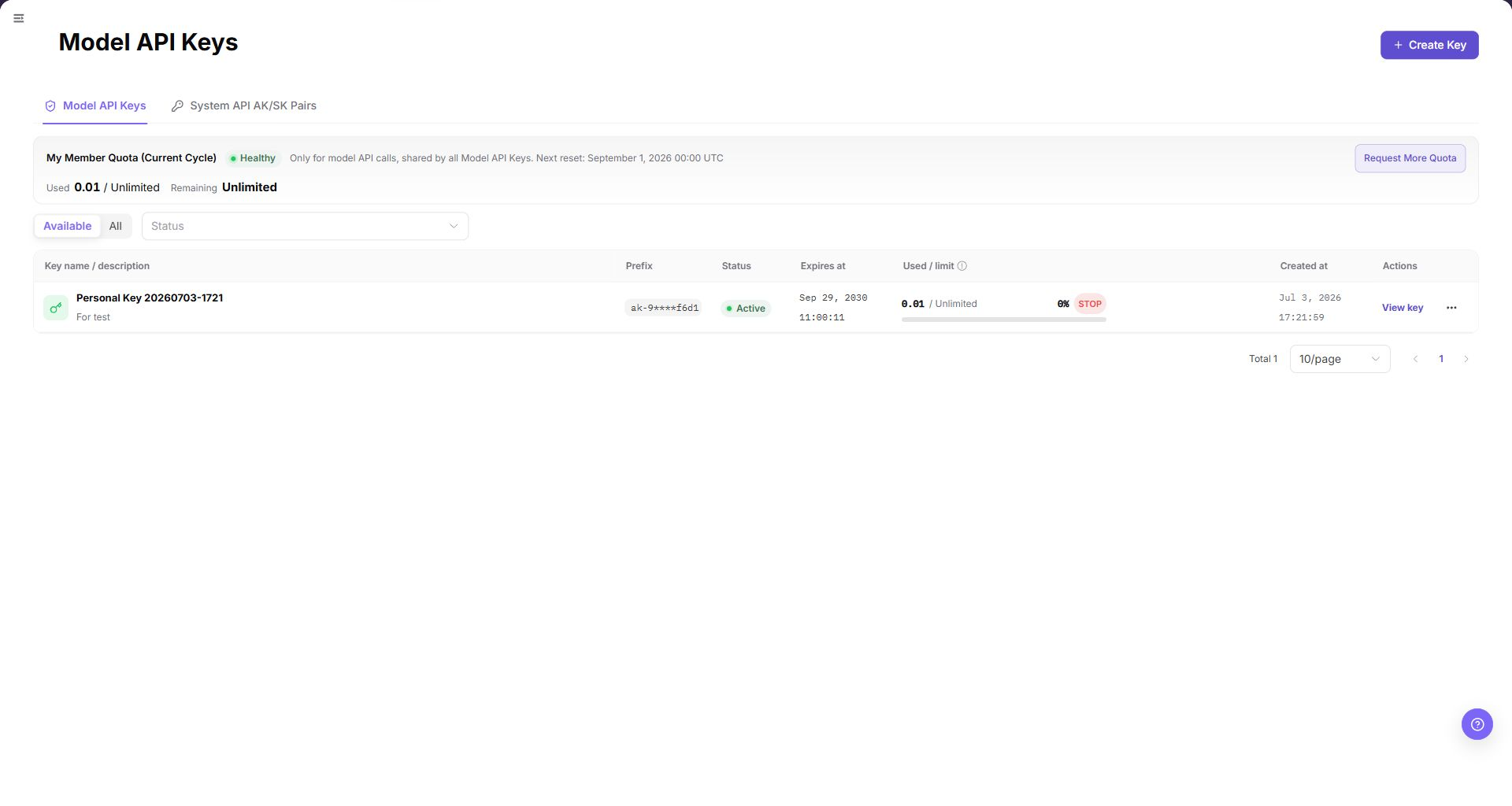
When validating credential boundaries, open Settings > Personal > My Keys from the target account's visible menu. Confirm the credential type, status, expiration, used / limit information, and available row actions for the current account. Use Request More Quota only to enter Settings > Members & Roles > Quota Requests; submitting the request is a separate write action. The My Keys page does not prove the business owner; validate project ownership or member responsibility in the relevant Projects or Team Members page.
Completion Checklist
Purpose: These are the exit criteria for the current feature task. Use them to decide whether the result is observable and reviewable and whether you can continue to the next step in the scenario. They do not repeat the procedure; if any item fails, follow the troubleshooting section below.
| Check | Pass Criteria |
|---|---|
| 1 | Unauthorized accounts cannot see the target menu, resource, or model. |
| 2 | Authorized accounts see only the agreed scope without extra governance permissions. |
| 3 | Exceeding quota, credits, or rate limits is rejected or limited as defined. |
| 4 | Revoked credentials or authorization no longer permit new requests. |
| 5 | Records identify owner, tenant, object, and time. |
Troubleshooting
| Symptom | Check First |
|---|---|
| Menu is visible but resources are empty | Resource authorization, region, tenant scope, and filters |
| Model is visible but calls fail | Personal key, model grant, rate limit, balance, and protocol |
| Creation fails after quota increase | Account credits, cluster capacity, flavor association, and template scope |
| Access remains after revocation | Current session, cache, API permission, and whether revocation was saved |
| User has excessive access | Role inheritance, multiple assigned roles, and platform-level menus |
User Manual
Use the user-manual entry to validate the effective menus and operations in each affected subsystem