My Deployments
Use My Deployments to verify runtime state, events, monitoring, API access, and lifecycle operations for a cloud model service.
Target Outcome
The deployment reaches a healthy state, responds to a controlled request, and can be monitored and stopped when no longer needed.
Applicable Roles
- End User
- Model Provider when publishing a validated deployment as a model service
Before You Start
- Record the deployment name, cloud platform, region, and expected creation time.
- Prepare a harmless test request and understand that running resources may continue to incur cost.
Procedure
- Open My Deployments and locate the target service by name, supported cloud platform, and region.
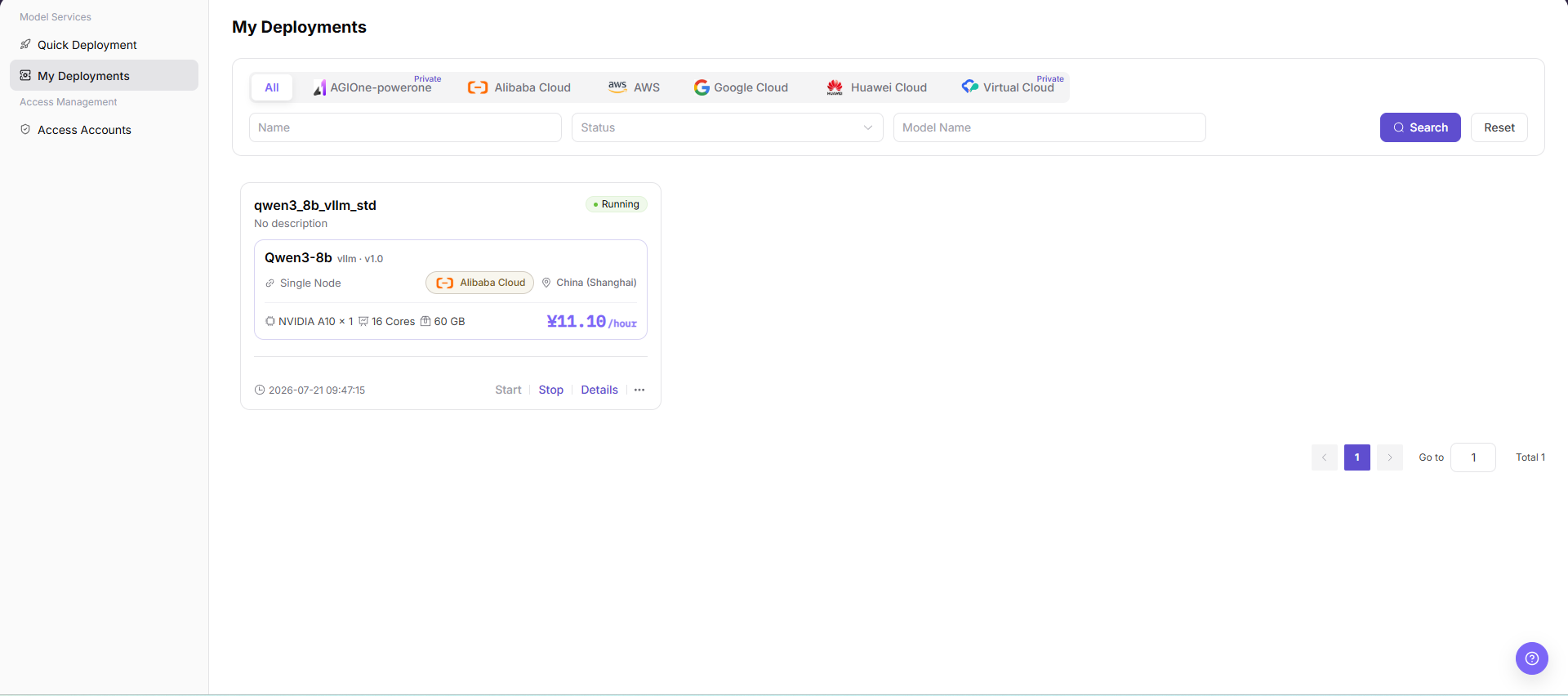
- Review deployment status and events until the service reaches a healthy running state. If it remains in Creating or fails, use the events to check the cloud account, quota, capacity, image, or startup command.
- Open monitoring, use a time range that covers the service runtime, and review resource levels and abnormal trends.
- Open API access, verify the request URL, method, headers, and parameter rules, then make one controlled call using redacted endpoint and authentication examples.
- Start, stop, or delete the deployment according to the usage plan. Before stopping or deleting, confirm business impact, cost changes, and data-retention requirements.
Publish a Model (Extended Operation)
- On the target deployment card, select ... > Publish.
- Select a publication area:
- Private Area: visible only within the team or tenant.
- Public Area: listed in the public catalog with independent billing and rate-limit configuration.
- Enter the model type, source, region, request URL placeholder, model ID, request headers, input and output modalities, token limits, currently available capabilities, and supported protocols.
- Add the model identifier and description, select immediate or scheduled publication, review the configuration, and submit it.
Other Operations
| Operation | Procedure |
|---|---|
| Switch cloud-platform tab | Select a currently supported platform or All to view its deployments. Huawei Cloud access is not currently supported. |
| Reset filters | Select Reset to clear name, status, and model-name filters. |
| View deployment details | Select Details to review basic information, API access, monitoring, and events. |
| Start a deployment | Select Start for a stopped deployment. |
| Stop a deployment | Select Stop for a running deployment and verify the cost change. |
| Publish a model | Select ... > Publish, then choose the private or public area. |
| Delete a deployment | Select ... > Delete. Deletion is irreversible, so confirm dependencies and data-retention requirements first. |
Completion Checklist
Purpose: These are the exit criteria for the current feature task. Use them to decide whether the result is observable and reviewable and whether you can continue to the next step in the scenario. They do not repeat the procedure; if any item fails, follow the troubleshooting section below.
| Check | Pass Criteria |
|---|---|
| 1 | Runtime state and events show no repeated failure. |
| 2 | Monitoring reflects the service runtime window. |
| 3 | A controlled API call succeeds. |
| 4 | Lifecycle actions update state and release resources as expected. |
Troubleshooting
| Symptom | Check First |
|---|---|
| Deployment stays in Creating or fails | Event records, cloud-account status, quota, capacity, image pull, and startup command |
| Service runs but API calls fail | API URL, request headers, model parameters, service port, and rate limit |
User Manual
Review My Deployments details, events, monitoring, API access, and lifecycle operations